Container stock

    Every container, where it really is, and what it is committed to

    The inventory is not a list someone keeps up to date. Each pickup, drop-off, release and sale moves the container in Krak Stack, so the stock you see is the stock you have.

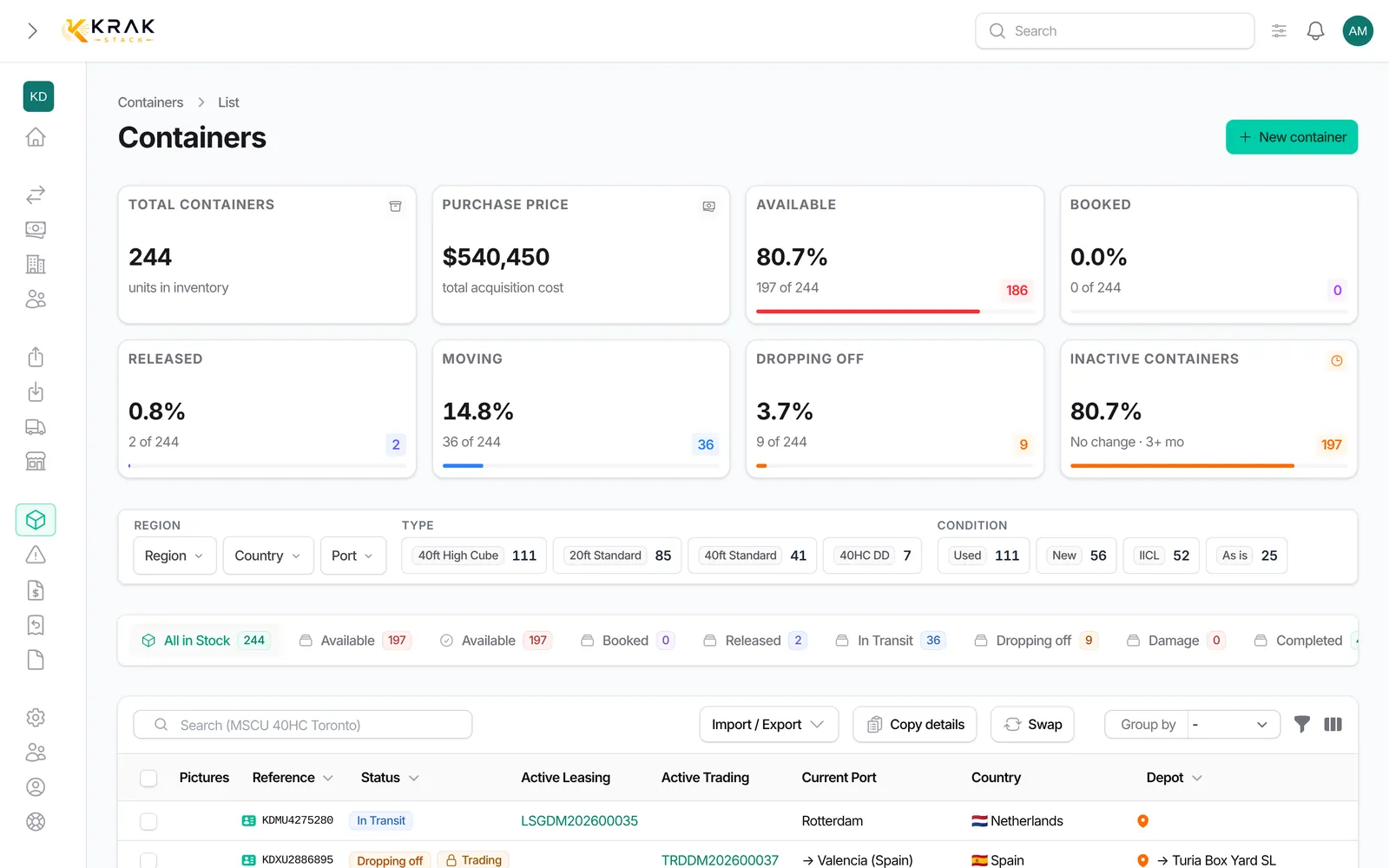
    Krak Stack: containers list with status tiles and drill-down by region, country and port

    What you can do

    Container register

    One record per box, with the ISO 6346 check digit verified on every number that comes in.

    Search and filters

    Region, country, port, depot, type, condition, year, dates and inactive since, combined in two clicks.

    Full history

    Every release, movement, deal, invoice and claim on one timeline per container.

    Bulk edit

    Change about 20 fields on a selection, update market values or sell the selection in one deal.

    Selection totals

    Purchase, sale and market value of the current selection, per currency, with the list ready to copy.

    Container swap

    A replacement takes the place of the leaving unit on the deal, with the history kept on both.

    Losses

    Record a loss, correct it or cancel it with a reason if the unit turns up.

    Inactive container alert

    Boxes that have not moved for too long are flagged before they become a storage bill.

    Photos from the phone

    Pictures taken at the depot gate land on the container record straight from the mobile app.

    How it works

    01

    Import your fleet

    CSV or Excel, with a wizard and a test run before anything is written.

    02

    Every movement updates the record

    Pickups, drop-offs, releases and sales move the container from the deal that caused them.

    03

    Find any box in two clicks

    Filter, open the record, and the whole story of the unit is there.

    In practice

    Example

    A trader receives a request for ten 40 ft high cube containers, cargo worthy, in Rotterdam. In the container list, the Available tab keeps only the containers that are at a depot and booked on no deal. Filtering on type, condition and port gives the boxes that can be offered today, with their depot and their purchase, sale and market totals for the selection. Copy details puts the list (reference, type, condition, status, depot) in the clipboard, ready to paste into the reply.

    In detail

    • Statuses that move by themselves. A container is In depot when created or imported, Booked when it is reserved on a deal, Released when a release is issued, In transit after its pickup, Dropping off when a return is issued, and back In depot at drop-off, or Sold or Completed when it leaves the fleet. Cancelling a pickup or a drop-off puts it back in its previous state.
    • Search that understands containers. One search looks at the reference, ISO code, status, depot, type, condition, colour, supplier, buyer, deal reference, port and country. A word that looks like a container number only searches references.
    • Filters by geography. Region, country and port filters narrow each other, and the port filter also finds containers heading to that port.
    • Inactive containers. The Inactive since filter (1 to 12 months) and the inactive indicator show the boxes that no longer move, and the record turns Last activity red after 30 days without an event.
    • A full history. Each container record gathers its deals, releases, returns, claims, invoices, documents and a timeline of every change, with the date and the person who made it.
    • Numbers checked. Container numbers are checked against the ISO 6346 check digit when you create, import or pick up a container.

    Connected to the rest

    Common questions

    Yes. Containers can be imported from a CSV or Excel file, and container numbers are checked against the ISO 6346 check digit on the way in.

    Yes. Status names, colours and icons are set by your admin in Settings, and the whole application uses them.

    No. Krak Stack is the owner's system of record. It reads the depot's stock reports and compares them with your inventory, it does not run the yard.

    In depot counts every container at a depot, including those booked on a deal. Available keeps only the free ones.

    Only with the "Override status" permission. It is better to correct the operation at its source, for example by cancelling a pickup.

    Yes. Deleted containers keep their history and can be restored from the list.

    Read the guides

    Learn more: Guide: container sizes · Guide: container numbers (ISO 6346)

    Get started

    See it on your own fleet

    The inventory is not a list someone keeps up to date. Each pickup, drop-off, release and sale moves the container in Krak Stack, so the stock you see is the stock you have.

    14-day free trial, no card needed. Demo on request.