Invoicing, credit notes and reminders

    Invoices built from the operation, paid and chased for you

    Every invoice starts from the deal that caused it. Reminders go out on their own, and when the money arrives, Krak Stack proposes the invoices it pays and learns from each match you validate.

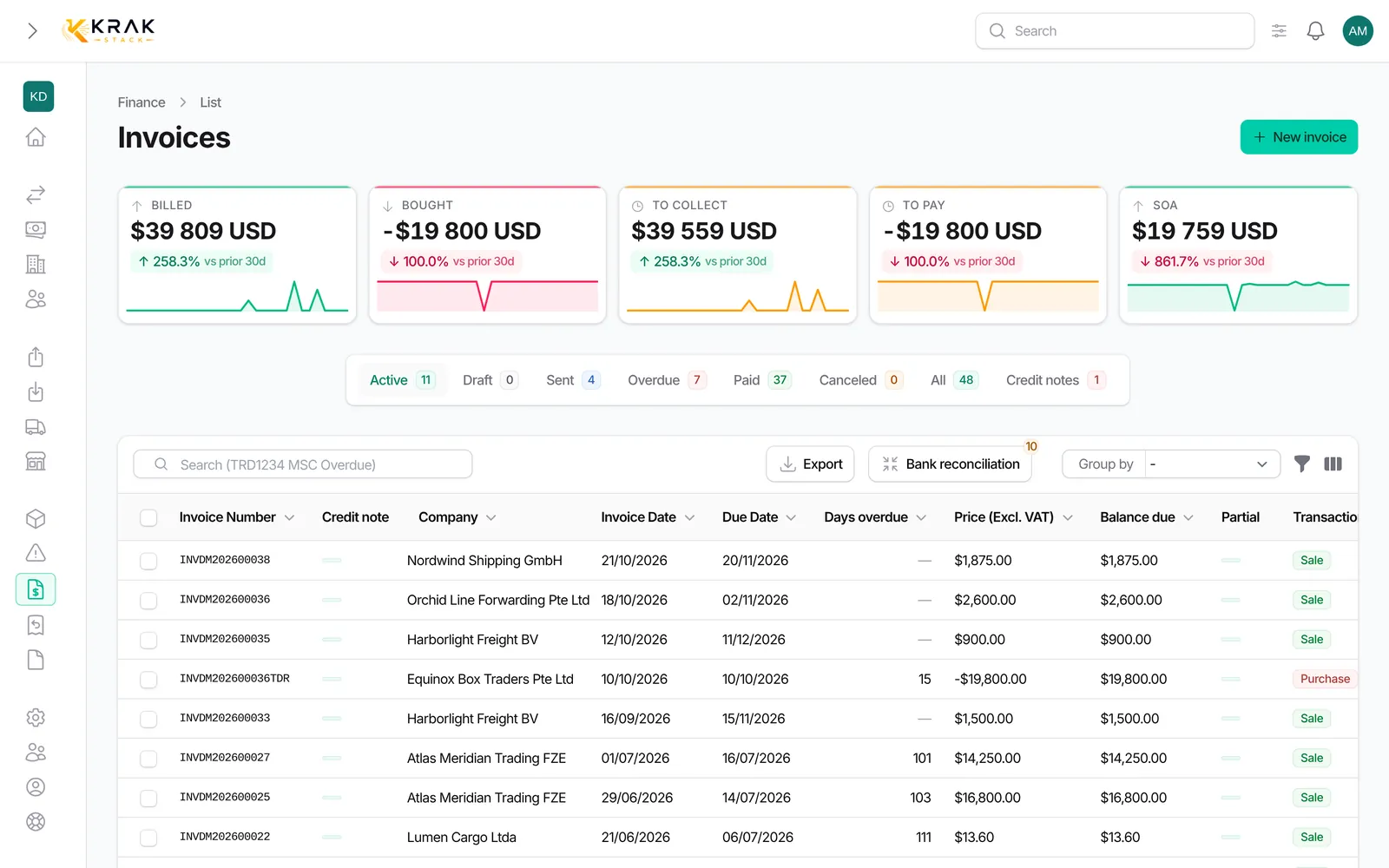
    Krak Stack: the invoices list with statuses, due dates and amounts per currency

    What you can do

    Invoices from the deal

    Pickup charges, trading, per diem, storage, damage, transport and other invoices, sale or purchase, each raised from its deal with the amounts already filled in.

    Credit notes, full or partial

    Credit a cancelled container, a price error or an accepted damage dispute. Credit notes sit in the invoice list with the rest.

    Proformas

    Send the proforma first, then validate it into the final invoice when the deal is confirmed.

    Your numbering

    Invoice and credit note numbers follow your own sequences, per type and per year.

    VAT handled

    Swiss VAT, EU reverse charge and export, or no VAT at all, set per client and applied on the invoice.

    Multi-currency, rate frozen

    Each invoice keeps the exchange rate of its day, so reporting in your base currency stays exact.

    Email with your templates

    Send invoices with your own wording, up to 100 PDFs at once, without blocking the screen.

    Partial payments and settled gaps

    Partial payments keep the balance open. A small difference, bank fees for example, is recorded and settled.

    Overdue set automatically

    Invoices past their due date turn overdue every day without anyone checking the list.

    Payment reminders that go out on their own

    Every morning Krak Stack sends the reminders that are due: three levels, one grouped email per client with the PDFs attached, your own wording. Set them for the whole workspace, a client or a single invoice. When the last level has passed, the invoice is flagged for a personal follow-up.

    Read the payment reminders guide

    How it works

    01

    Invoice from the deal

    The charge, the containers and the amounts come from the operation.

    02

    Sent and reminded

    Emailed with your template, then chased by the reminders you set once.

    03

    Matched to the bank payment

    Reconciliation proposes the invoices each payment covers.

    See how

    In practice

    Example

    At month end, a finance assistant opens the leases with billable days and creates the per diem invoices from each lease: the period starts the day after the last one invoiced, and each container line shows its days and amount. The invoices get their numbers when they are sent by email to the client's invoice contacts. With payment reminders on, an unpaid invoice is reminded automatically after its due date; a client with three overdue invoices receives one email listing all three with a total per currency. When the money arrives, the bank reconciliation marks the invoices paid.

    In detail

    • Every invoice type of the trade. Pickup charge, trading, per diem, storage, damage, transport and miscellaneous, as sale invoices you issue or purchase invoices you receive with the supplier's PDF.
    • Numbers on issue, not on draft. A sale invoice gets its number when it is sent or downloaded; viewing the PDF does not issue it. Numbers follow your format (prefix, company code, year, counter).
    • Credit notes. Credit all or part of a sent or paid invoice, by lines or by amount, with a reason. The credit note is deducted from the balance, refunded or kept as a credit, and the invoice shows it.
    • Payment reminders. Three levels, with your own texts, set for the workspace, a client or a single invoice. At most one email per client per day, PDFs attached, and a "manual follow-up required" flag when the last reminder has gone.
    • Partial payments. Record payments up to the balance due; the invoice shows "Partial" until it is settled.
    • Many PDFs at once. Download up to 100 invoices in one ZIP.
    • Deals that close themselves. A deal is invoiced when all its sale invoices are sent and completed when they are all paid; purchase and storage invoices never block it.

    Connected to the rest

    Common questions

    Yes. Bulk actions such as marking invoices paid or downloading a ZIP of PDFs run in the background, without blocking the screen.

    Attach the payment and the invoice is marked paid. The small difference is recorded as bank fees.

    No. Matches that are certain can be validated automatically. Everything else waits for your decision, and you can reject a wrong proposal.

    No. Only sale invoices are emailed; purchase invoices are received and can be marked paid from the draft.

    No. Credit notes on one invoice cannot exceed its amount in total.

    The contacts with the Invoice role in the billed company. Without such a contact, the invoice is not reminded.

    Read the guides

    Get started

    See it on your own fleet

    Every invoice starts from the deal that caused it. Reminders go out on their own, and when the money arrives, Krak Stack proposes the invoices it pays and learns from each match you validate.

    14-day free trial, no card needed. Demo on request.