Trading

    Buy and sell containers without losing track of a single unit

    Sell, buy or buy-and-sell in one deal. The containers, the release, the invoices and the deal status move together, from the first booking to the last payment.

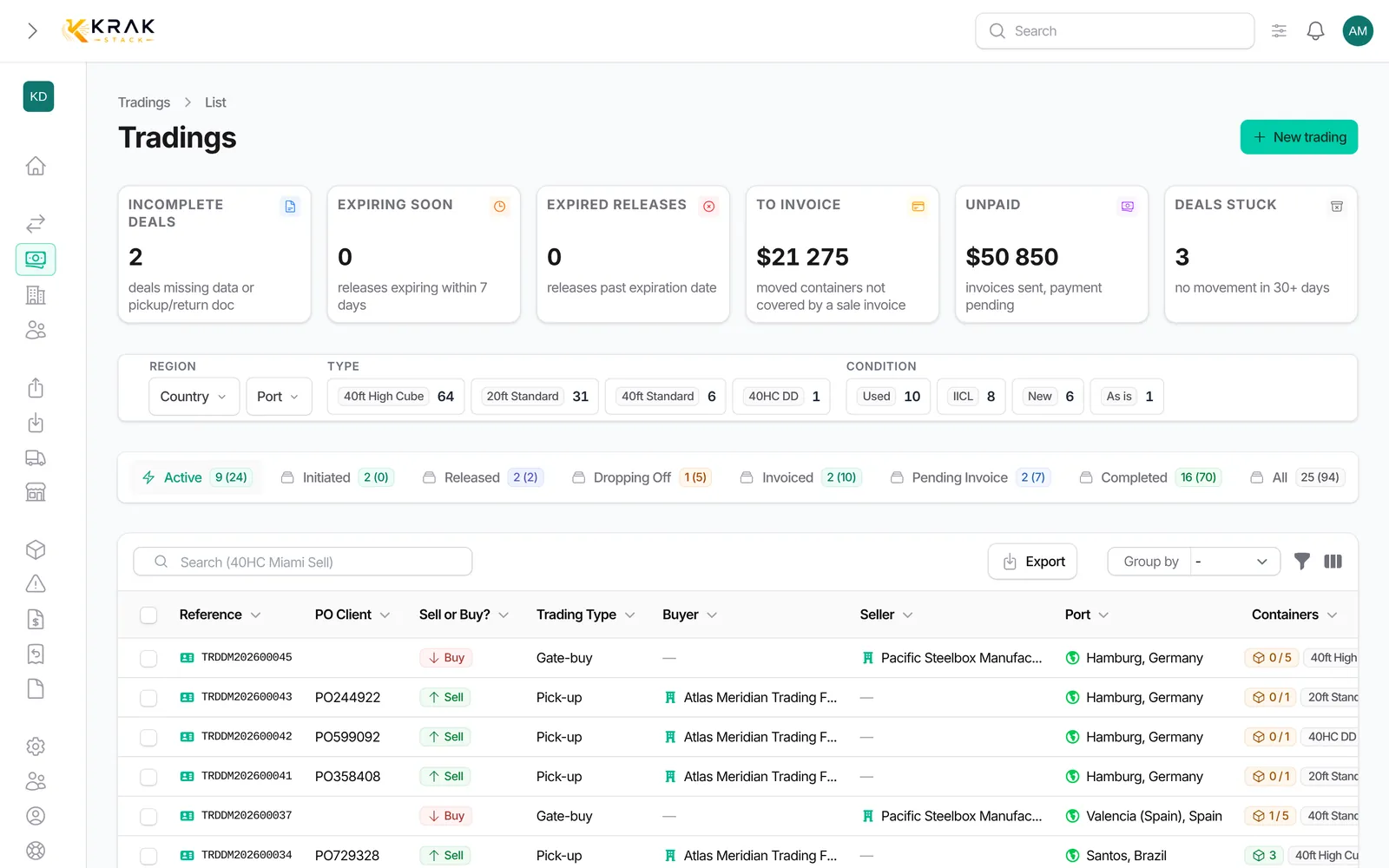
    Krak Stack: trading deals colour-coded by sell, buy and buy-and-sell

    What you can do

    Six trading types

    Sell, buy, buy and sell, each by pickup or by gate-buy. One deal can carry the purchase and the sale on the same containers.

    Prices per type and condition

    Target prices per port, type and condition, updated from your own sales as they complete.

    Proformas validated into invoices

    Send the proforma, then validate it into the final invoice when the deal is confirmed.

    Stock transfers

    Move stock between your own locations, with the right paperwork on each side.

    Sell from a container record

    Start the sale from the container itself, the deal picks up the unit and its location.

    Transport orders with PDF

    Order the transport from the deal and send the transporter a branded PDF.

    Trading confirmation PDF

    The confirmation carries the deal terms and the containers, ready for the counterparty.

    Margin of each sale

    The margin per sale, including the rents earned on the containers before they were sold.

    How it works

    01

    Deal created with its prices

    Type, condition, quantity and prices, with the containers booked.

    02

    Release or gate-buy

    The containers leave by a release at the depot or change hands at the gate.

    03

    Invoice and margin follow

    The invoice is raised from the deal, the margin is counted with the rents earned before.

    In practice

    Example

    A trader buys five 40 ft high cube containers from a supplier in Valencia and resells them to an end user who collects them at the same depot. One Buy/Sell deal with the Pick-up handover covers both sides: the release comes from the supplier's depot, the containers are created in Krak Stack as the buyer's haulier picks them up, and the purchase and sale invoices sit on the same deal with its margin. If the buyer wants the boxes as they come back from a lease instead, a Gate-buy deal transfers them at drop-off.

    In detail

    • Six combinations. A direction (Sell, Buy or Buy/Sell) and a handover mode (Pick-up, when containers leave a depot, or Gate-buy, when they enter one). Sell deals are shown in green, Buy in red and Buy/Sell in orange everywhere.
    • Buying from a supplier. A Pick-up Buy or Buy/Sell deal uses a release from the supplier, with the purchase price and currency, the supplier's release and invoice attached. A supplier release created from a lease generates the purchase deal automatically.
    • Gate-buy. Containers on lease can be sold at the end of the lease: instead of coming back into your stock, they are dropped off at the buyer's depot and counted as sold.
    • Prices per container. Leave the price empty to set a different price for each container at invoicing time.
    • Currencies locked by the invoices. The sale currency locks with the first sale invoice and the purchase currency with the first purchase invoice.
    • Margin per deal. The profitability section shows revenue, costs and margin as projected, invoiced and cashed, converted at the rate frozen on the invoices.
    • Notifications. Whoever follows the sale is told when containers are picked up or received and when the status changes, in the bell, in the summary e-mail or on the phone.
    • Units cancelled cleanly. Units that have not left can be cancelled from the deal, with the fees and credit note that go with it; containers that have left are handled with a return.

    Connected to the rest

    Common questions

    Yes. A gate-buy sale is attached to the return of the lease, and both deals update when the container is dropped off.

    Yes. A purchase invoice can carry the supplier's PDF and number, and stays editable when the supplier re-issues it.

    Yes. Each deal has its own currency and the exchange rate of the day is stored for reporting in your base currency.

    Only while the deal is Initiated. The type can no longer change once a container has been picked up or dropped off.

    No. Purchase invoices never block closing; the sale invoices do.

    In its Profitability section, visible to the roles allowed to see amounts.

    Read the guides

    Learn more: Guide: container grades

    Get started

    See it on your own fleet

    Sell, buy or buy-and-sell in one deal. The containers, the release, the invoices and the deal status move together, from the first booking to the last payment.

    14-day free trial, no card needed. Demo on request.